Chrome extension for the Shopify admin
See which orders matter at a glance.
OrderColor color-codes the Orders list in your Shopify admin by tag, country, total, payment or fulfillment status. Pick a condition, pick a color, and every matching row is tinted and badged. Your rules stay in your browser.
Get early access
Be first in. Leave your email and we’ll send your invite.
What OrderColor does
Pick a condition, pick a color. Every matching order row is colored and badged, on every page of the list, after every filter and sort.
Tag contains
“VIP”, “wholesale”, “rush”: any tag in the Tags column.
Shipping country is
From the Destination column: “Berlin, Germany” counts as Germany.
Order total is at least / at most
The Total column as a number, so big orders and tiny ones stand out.
Fulfillment or payment status is
Unfulfilled, Partially fulfilled, On hold; Paid, Pending, Authorized, Refunded.
Note contains
When the note text is shown in the list.
Status is, on Products
Active, Draft or Archived, on the Products list. Products and Customers are part of Pro.
How it works
Add OrderColor to Chrome
Install it from the Chrome Web Store. The free plan needs no account and no payment.
Add a rule
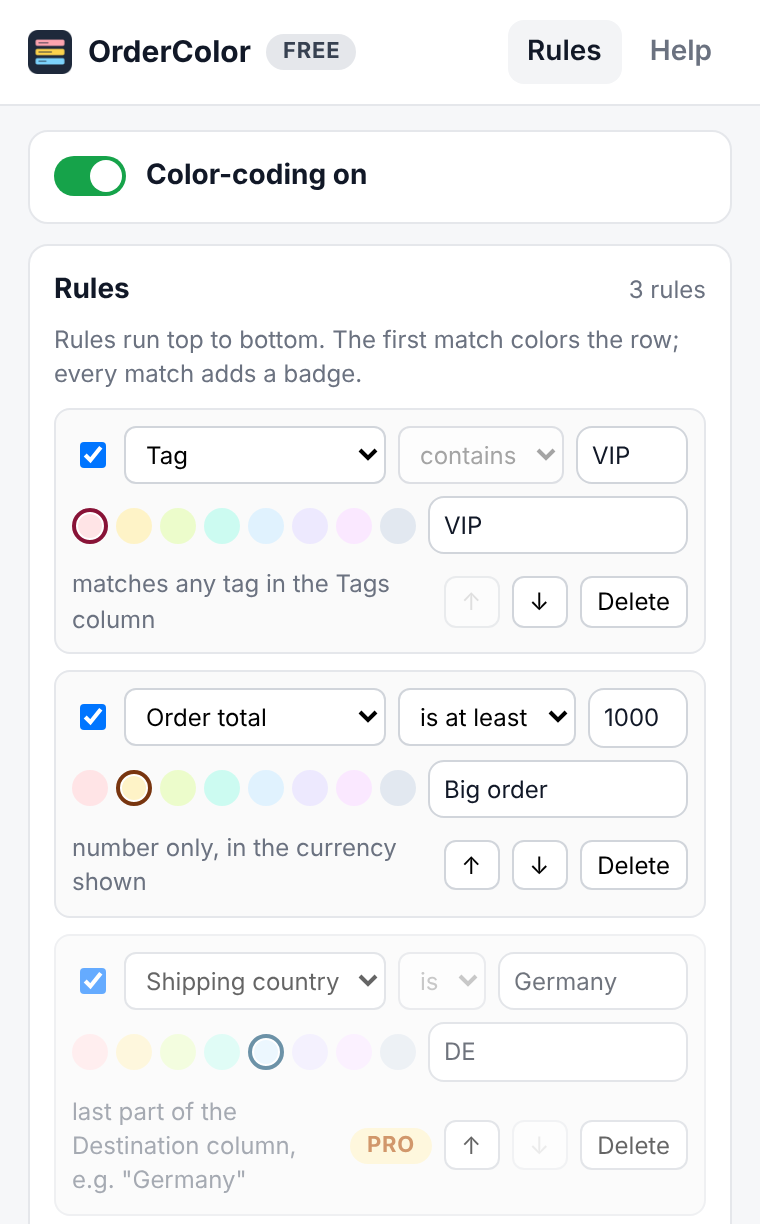
Open OrderColor from the Chrome toolbar, click Add rule, choose a condition such as Tag contains VIP, and pick one of eight colors. Add your own badge text if you like.
Open your Orders list
In your Shopify admin, every matching order is tinted, with a small badge in the Order column. Change page, filter or sort: the colors follow.
Read it at a glance
The first matching rule sets the row’s color, and each matching rule adds its badge (up to three), so a row can say “VIP · Big order · DE” without you opening it.
See it
The rule editor is a real capture of the OrderColor popup. The orders list is a drawing with sample rows: no real store and no customer names.
Pricing
Prices at launch. The free plan has no time limit.
Free plan
Free
- 2 rules on the Orders list
- All order conditions and all 8 colors
- No time limit
OrderColor Pro
$7/month
- Unlimited rules
- Products and Customers lists too
- Import and export rules as JSON (share a set with your team or move between computers)
- Cancel any time
OrderColor Pro is an optional subscription, paid through ExtensionPay and Stripe from inside the extension. The free plan works without an account or payment.
Questions
Does OrderColor send my store’s data anywhere?
No. It reads the rows already on your screen and keeps your rules in Chrome’s extension storage. It never calls Shopify’s APIs and makes no network requests of its own. The only outside service is ExtensionPay, for the optional Pro plan. Details are in the privacy policy.
Does it change my orders?
No. It only changes the background of rows on your screen. It never edits an order, product or customer and never clicks anything for you.
Why is a rule not coloring anything?
A rule only sees what the list shows. If it needs a column, such as Tags or Destination, add that column with Shopify’s column picker. Statuses must match the badge text, for example “Unfulfilled”.
Can my team use the same rules?
On Pro, export your rules as a JSON file and import it on another computer. The file holds only your rules.
Does the text stay readable on the colors?
The eight colors are light tints chosen so the admin’s text on them keeps a contrast ratio of at least 7:1, and a test in the extension checks each one. OrderColor never changes the text color.
What happens when Shopify changes its admin?
If OrderColor no longer recognizes the list, it stays quiet rather than break the page, and an update follows.